
For universities, schools, training centers and companies
Turn your course material into test questions, each one with its source.
Upload a PDF or PowerPoint. Exama drafts the questions and shows the passage each one comes from. Your team reviews and approves every question before it is used, then exports them as PDF, Excel, CSV or Moodle GIFT.
Monthly or yearly plans · Prices exclude VAT · Nothing is charged automatically
- Stored in the EU (Frankfurt)
- Only your organization sees its material
- Nothing approved without a reviewer
- Export at any time: PDF, Excel, CSV or Moodle GIFT
How it works
From a course file to an approved question bank
Four steps, all inside the organization workspace at app.exama.app.
-
Upload a course
A PDF or PowerPoint (.pptx) with real text. Exama reads it, splits it into pages or slides and finds its topics.
-
Draft questions
Ask for up to 20 drafts at a time, for the whole course or one topic. Each draft comes with the quoted passage, its page or slide and automatic checks.
-
Review as a team
The review queue shows the source next to the question. Reviewers edit, approve or reject — one by one, with keyboard shortcuts on a desktop.
-
Export what was approved
Only approved questions leave the workspace: a PDF for trainees (questions only) or for trainers (with the answer key), Excel, CSV or Moodle GIFT, for one course, one topic or everything.
Grounded, then reviewed
Every question shows where it comes from
Drafts are written from your material only — not from what a model remembers about the subject. Then your team decides.
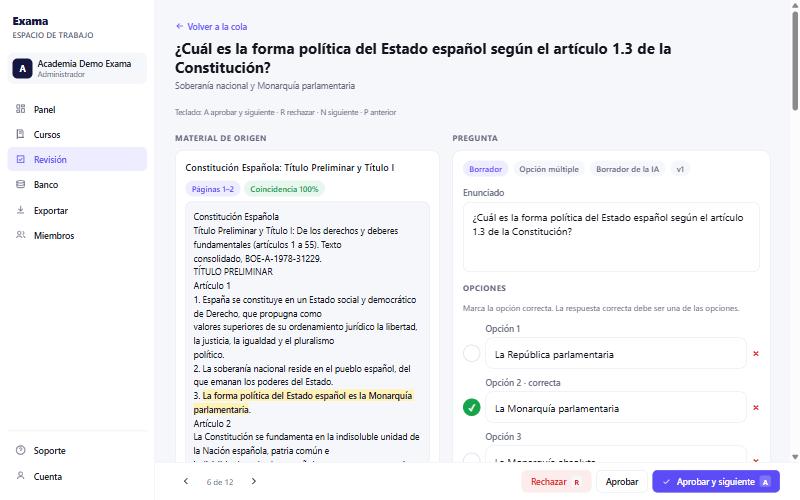
- The quoted passage is located in your course, with its page or slide, and highlighted next to the question.
- Automatic checks flag drafts whose quote could not be found or only roughly matches, answers with numbers that are not in the passage, and weak multiple-choice distractors.
- A second check reads the located passage and says whether it supports the answer — advisory, shown to the reviewer.
- Nothing is approved automatically. A reviewer approves every question that enters the bank.
-
Side-by-side review
Source passage on the left, editable question on the right. Approve, reject, or approve and move to the next.
-
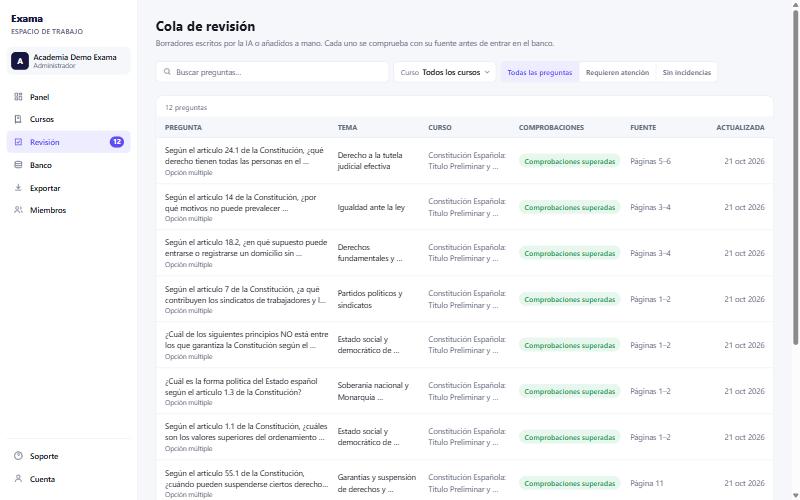
Review queue
Drafts in a searchable table, filtered by course and topic, with the ones that need attention first.
-
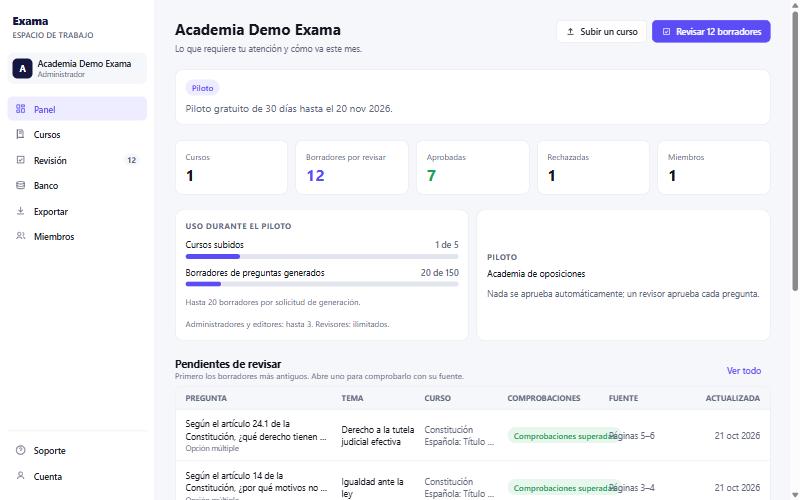
Dashboard and usage
Courses, drafts to review, approved questions and members at a glance — and how much of the plan is used.
Who it is for
Every kind of organization, one workspace
When you create the organization you say what kind it is: university or higher education, school, training center, company, tutoring or exam preparation. The workspace is the same for all of them.
-
Universities and schools
For courses taught from your own syllabus, where teaching staff keep control of every question.
- Multiple-choice and short-answer questions
- Questions organized by module and topic within each course
- Every question shows the passage it is based on
-
Training centers and companies
For professional courses and employee training built from your own modules.
- Drafts from PDFs and PowerPoint slides
- Reviewed and approved by your team before use
- Exports as PDF, Excel, CSV or Moodle GIFT
-
Tutoring and exam preparation
For centers preparing students for exams, where practice must follow the material closely.
- Questions that stay within the uploaded material
- Approve, reject or edit each draft
- Reviewers at no cost, on every plan
Your team
Roles that match how a question bank gets made
Every member signs in with their own account, so each approval carries a name.
- Admin
- Adds and removes members, changes roles and settings — and does everything an editor does.
- Editor
- Uploads courses, drafts questions, adds questions by hand, exports and deletes.
- Reviewer
- Reads, edits, approves and rejects questions. Nothing else.
Plans count admins and editors. Reviewers are unlimited on every plan.
Usage you can see
The dashboard shows courses uploaded and question drafts generated against your plan. The workspace stops at the limit; it never charges for more.
Pricing
Plans for your organization
Choose the plan that fits your volume. Exama activates it for your organization once we have agreed on it with you. There is no online checkout and nothing is charged automatically.
-
Starter
For independent trainers and small organizations.
€59/month + VAT
or €590/year + VAT (save 17%)
- 3 course uploads per month
- 150 question drafts per month
- 2 admins or editors
- Unlimited reviewers
- Up to 20 drafts per request
- PDF, Excel, CSV and Moodle GIFT export
- Most chosen
Essential
For one center or department.
€149/month + VAT
or €1,490/year + VAT (save 17%)
- 10 course uploads per month
- 500 question drafts per month
- 10 admins or editors
- Unlimited reviewers
- Up to 20 drafts per request
- PDF, Excel, CSV and Moodle GIFT export
-
Professional
For several courses running at once.
€349/month + VAT
or €3,490/year + VAT (save 17%)
- 100 course uploads per month
- 2,000 question drafts per month
- 25 admins or editors
- Unlimited reviewers
- Up to 20 drafts per request
- PDF, Excel, CSV and Moodle GIFT export
-
Institution
For centers with their own volumes.
Custom
pricing and allowances
- Course and draft allowances set with you
- Admin and editor seats set with you
- Unlimited reviewers
- PDF, Excel, CSV and Moodle GIFT export
Prices exclude VAT. VAT is added at the applicable rate when the plan is invoiced.
Plans are agreed by email and activated by Exama; you are never charged without having asked for a plan.
Getting started
From a first conversation to your workspace
Plans are activated by Exama, so getting started goes through a short conversation with us.
- Tell us about your organizationRequest a demo or write to us: what you teach, and how many courses and people are involved.
- Agree on a planStarter, Essential, Professional or Institution, monthly or yearly. We confirm the plan and its terms by email.
- Create the organization accountYour name, your email, and the organization’s name and type. Confirm your email with the link we send you.
- We activate your planOnce it is active, your team can upload courses, draft questions and add colleagues as editors or reviewers.
Before a plan is active
- The account and the workspace can be created at any time.
- Uploading courses and drafting questions start once Exama has activated a plan.
- Nothing is charged: a plan is only activated after you have asked for one.
FAQ
Questions organizations ask
What can we upload?
PDF and PowerPoint (.pptx) files that contain real text. Scanned images without a text layer cannot be read. Each course is one file; you can upload as many courses as your plan allows.
What counts as a question draft?
A draft is one question Exama writes and keeps for your review. You ask for a number of drafts (up to 20 per request) and only the ones delivered count against your allowance. Questions your editors add by hand do not count.
On Starter, Essential and Professional the allowance is per calendar month.
Are the questions based on our material?
Yes. Drafts are written only from the text of the course you uploaded, and each one quotes the passage it is based on, with its page or slide. Drafts whose quote cannot be found in the material are flagged for the reviewer.
It is still a draft: a reviewer reads, edits if needed and approves it before it enters the bank.
Can we edit questions, or write our own?
Yes. Reviewers can edit any draft before approving it. Editors can add questions by hand; they go through the same review queue as the drafted ones.
How do we get the questions into Moodle?
Export approved questions as a Moodle GIFT file and import it into a question bank in Moodle. Exports are also available as a PDF for trainees (questions only) or for trainers (with the answer key), as Excel and as CSV for other tools. Exports include approved questions only, for one course, one topic or everything.
Where is our material stored, and who sees it?
Courses, questions and accounts are stored on servers in the European Union (Frankfurt). Only members of your organization can see its material. To draft and check questions, the relevant passages are sent to a third-party AI provider (Anthropic); Exama uses your material only to draft and check questions for your organization.
Organization-specific terms and a data processing agreement are being finalized; ask us when you request a plan.
Can we try Exama before choosing a plan?
Yes: ask us for a demo and we will show you the workspace with real course material. For some projects we also agree a pilot with the organization, for a limited period and with set allowances. Pilots are agreed case by case; they are not available by default.
How is a plan paid?
Request Starter, Essential, Professional or Institution by email. We agree the plan and billing period with you and activate it; prices exclude VAT. There is no online checkout, and nothing is charged automatically — not at the start, not at renewal.
See it with one of your courses.
Request a demo, or tell us which plan fits your organization.
Plans are activated by Exama. Nothing is charged automatically. Your material stays yours.